Here is a tutorial of how to do it: use SD Connect C4 mux to enable tank info & L/100KM into KM/L mercedes W211 (W203) (w221) and more
In DAS Developer mode :
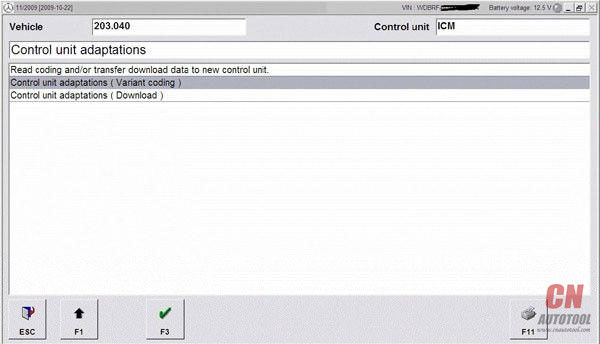
Kombiinstrument -> Diagnose nach Werkangabe -> Steuergerate-Anpassungen ->
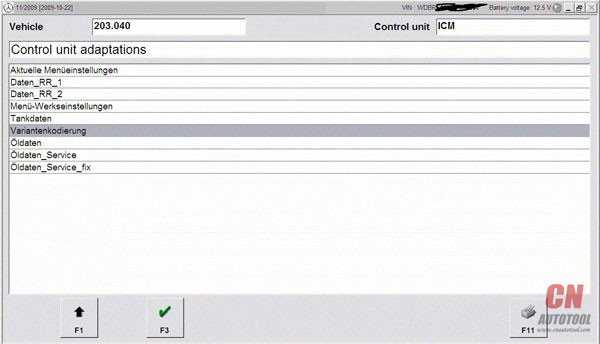
Steuergerate-Anpassungen (Variantencoderierung) -> Variantkodierung Werkeinstellungen ->
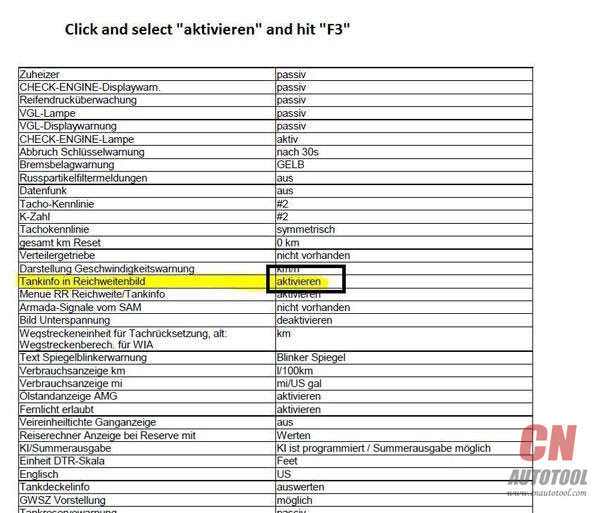
In the menu that shows , you scroll down untill you read the line : Tankinfo im Reichweitebild
enable this option
now you have tankinfo in the screen that otherwise only showed range
If you allso wanna adjust the way fuel consumtion is showed
you scroll a little more down untill you read the line : Verbrauchanzeige km
you can change it from L/100km into km/l
Scroll down and confirm Coding by pressingF3
if you watch your Instrument Cluster , you notice that scrolling through the menu , nothing changed .
For this , the “Kombiinstrument” needs a reboot.
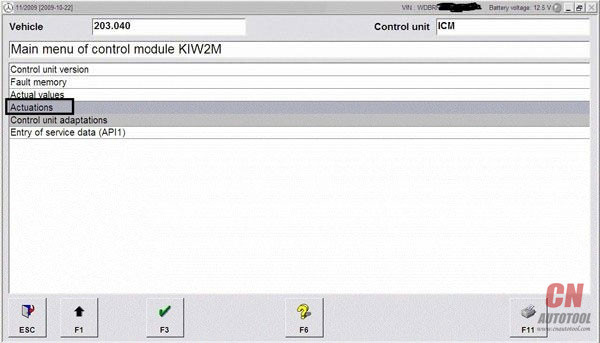
to do this in Developer mode we go back by hitting F1 -> 3 times
then choose Ansteuerungen -> Gesamstliste aller Ansteuerungen ->
Scroll down untill you see the line : Steuergeraet Resetten (PowerON-Modus) (FN_Reset_SG_Power_ON)
Press F3 and confirm again with F3
Now you will see the “Kombiinstrument” reboots
This article is published by CnAutotool.com.
http://obd2scanner.info/2018/03/10/how-to-enable-tank-info-l100km-into-kml-mercedes-w211-w203-etc/
2018年3月9日星期五

How to Enable tank info & L100KM into KML Mercedes W211 W203, etc
Here is a tutorial of how to do it: use SD Connect C4 mux to enable tank info & L/100KM into KM/L mercedes W211 (W203) (w221) and more
In DAS Developer mode :
Kombiinstrument -> Diagnose nach Werkangabe -> Steuergerate-Anpassungen ->
Steuergerate-Anpassungen (Variantencoderierung) -> Variantkodierung Werkeinstellungen ->
In the menu that shows , you scroll down untill you read the line : Tankinfo im Reichweitebild
enable this option
now you have tankinfo in the screen that otherwise only showed range
If you allso wanna adjust the way fuel consumtion is showed
you scroll a little more down untill you read the line : Verbrauchanzeige km
you can change it from L/100km into km/l
Scroll down and confirm Coding by pressingF3
if you watch your Instrument Cluster , you notice that scrolling through the menu , nothing changed .
For this , the “Kombiinstrument” needs a reboot.
to do this in Developer mode we go back by hitting F1 -> 3 times
then choose Ansteuerungen -> Gesamstliste aller Ansteuerungen ->
Scroll down untill you see the line : Steuergeraet Resetten (PowerON-Modus) (FN_Reset_SG_Power_ON)
Press F3 and confirm again with F3
Now you will see the “Kombiinstrument” reboots
This article is published by CnAutotool.com.
http://obd2scanner.info/2018/03/10/how-to-enable-tank-info-l100km-into-kml-mercedes-w211-w203-etc/
In DAS Developer mode :
Kombiinstrument -> Diagnose nach Werkangabe -> Steuergerate-Anpassungen ->
Steuergerate-Anpassungen (Variantencoderierung) -> Variantkodierung Werkeinstellungen ->
In the menu that shows , you scroll down untill you read the line : Tankinfo im Reichweitebild
enable this option
now you have tankinfo in the screen that otherwise only showed range
If you allso wanna adjust the way fuel consumtion is showed
you scroll a little more down untill you read the line : Verbrauchanzeige km
you can change it from L/100km into km/l
Scroll down and confirm Coding by pressingF3
if you watch your Instrument Cluster , you notice that scrolling through the menu , nothing changed .
For this , the “Kombiinstrument” needs a reboot.
to do this in Developer mode we go back by hitting F1 -> 3 times
then choose Ansteuerungen -> Gesamstliste aller Ansteuerungen ->
Scroll down untill you see the line : Steuergeraet Resetten (PowerON-Modus) (FN_Reset_SG_Power_ON)
Press F3 and confirm again with F3
Now you will see the “Kombiinstrument” reboots
This article is published by CnAutotool.com.
http://obd2scanner.info/2018/03/10/how-to-enable-tank-info-l100km-into-kml-mercedes-w211-w203-etc/
(Solved) SDC4 setting failure and configuration don’t work
Solution to the failure of MB SD Connect C4 setting and configuration don’t work.

Unscrew


This is correct wiring diagram.

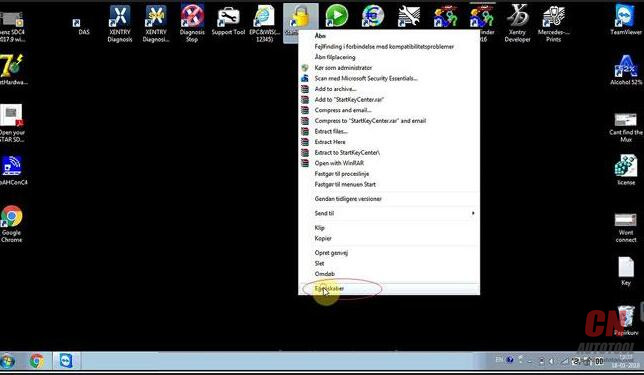
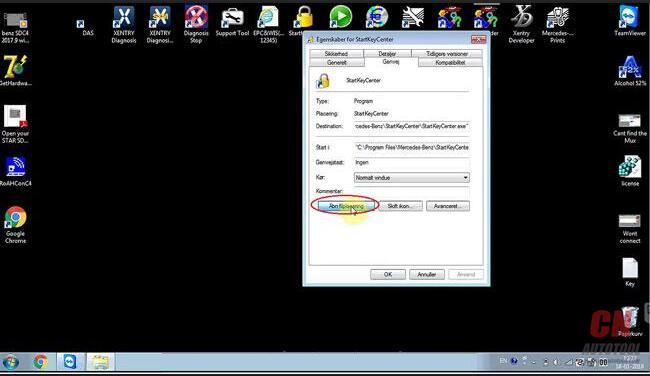
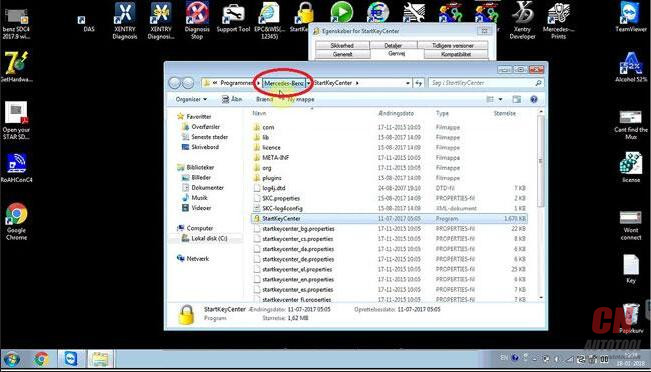
Right click on the icon “StartKeyCenter”, then “Properties” – “Find target”
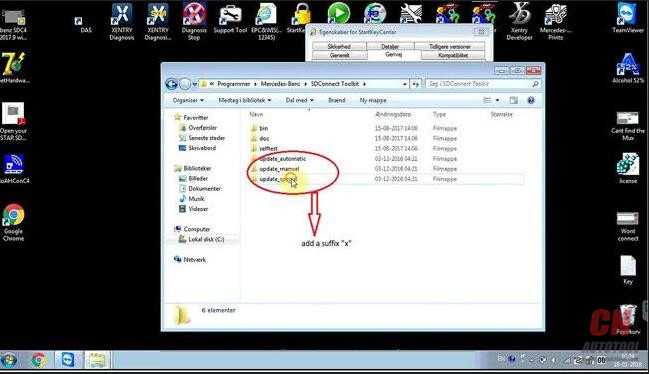
On the desktop, right click on “StartKeyCenter”, then option “Properties” – “Find target” – “Mercedes Benz” – “Sdconnect ToolKit”, rename the last 3 folder, delete the final letter”x”


At the right corner of the desktop, click “Administrator”.

This toolkit is being initialized

Click “00/Cable Accessible”


Click on “Register / Configure”

Update “CSD_2_11.zip”

The system software was successfully updated.26-14
Back to update “Bootimage_2_3.zip”

The system software was successfully updated.

Back to click on “00/ Cable Accessible”
You see it’s accessible.

Click on “Software update”, then “03 PMpic29_cpld13.zip”

The system software was successfully updated.

Check the information

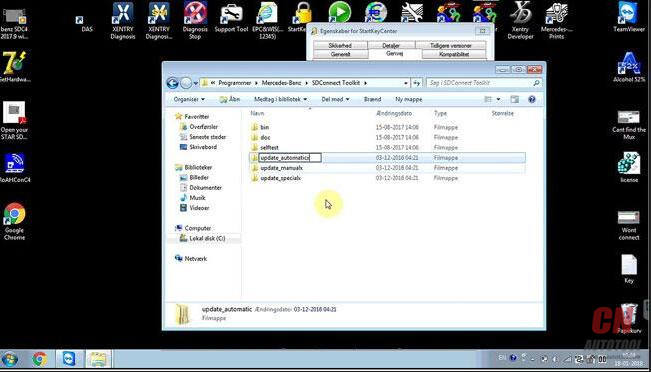
Back to the desktop, right click on “StartKeyCenter”, then option “Properties” – “Find target” – “Mercedes Benz” – “Sdconnect ToolKit”, rename the last 3 folder, add a suffix “x”


Done
SDC4 tech support supplied by http://www.cnautotool.com
http://obd2scantool.net/2018/03/10/solved-sdc4-setting-failure-and-configuration-dont-work/
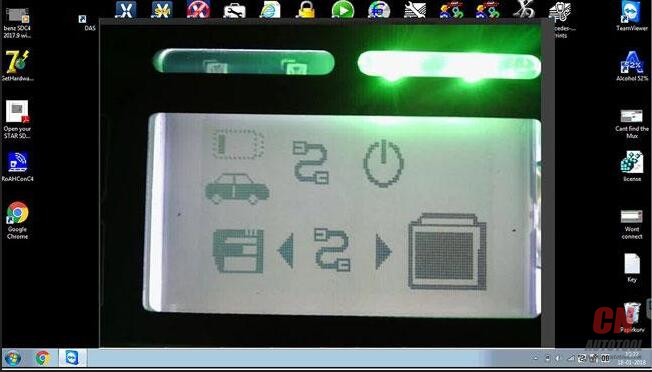
Unscrew
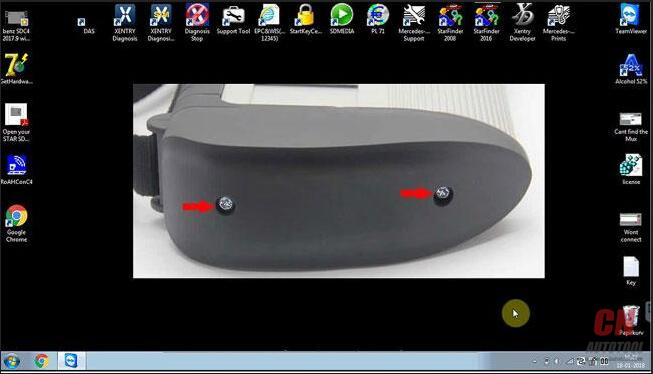
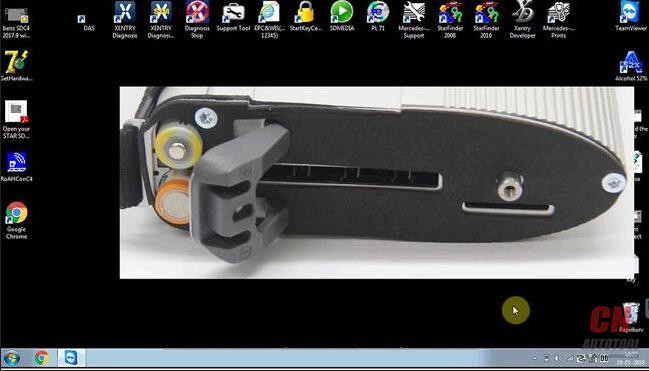
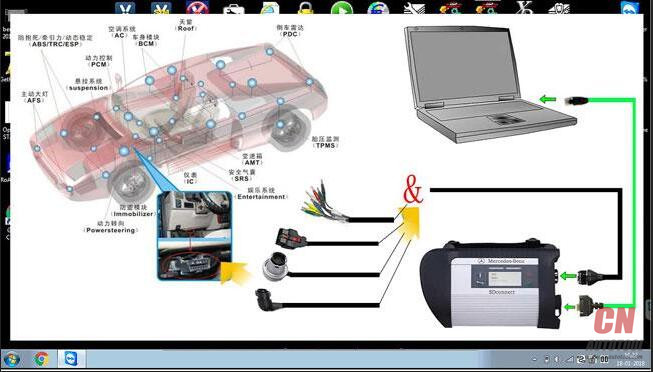
This is correct wiring diagram.
Right click on the icon “StartKeyCenter”, then “Properties” – “Find target”
On the desktop, right click on “StartKeyCenter”, then option “Properties” – “Find target” – “Mercedes Benz” – “Sdconnect ToolKit”, rename the last 3 folder, delete the final letter”x”


At the right corner of the desktop, click “Administrator”.

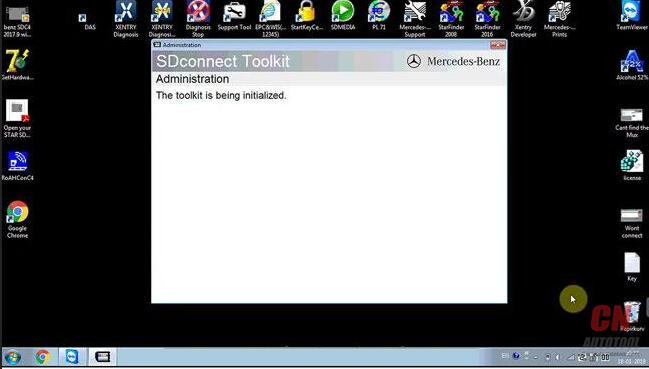
This toolkit is being initialized
Click “00/Cable Accessible”
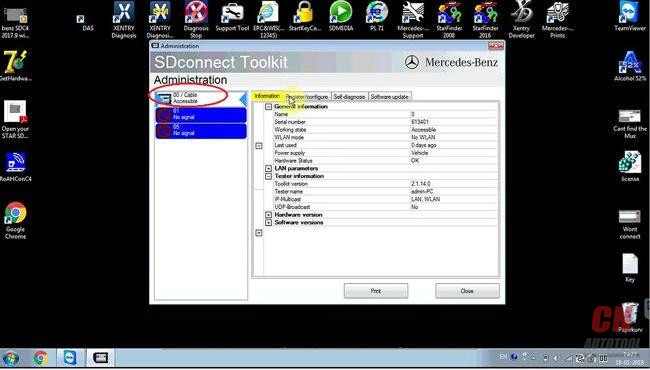
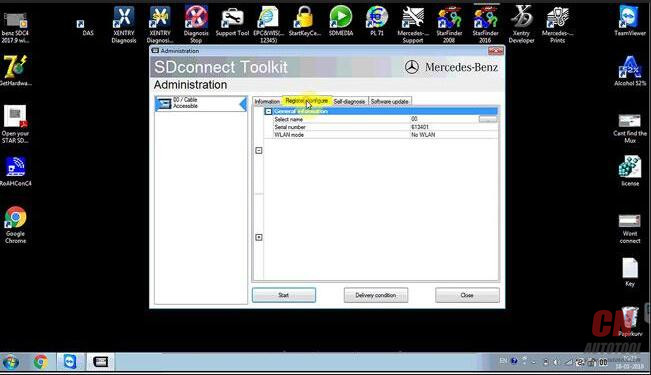
Click on “Register / Configure”
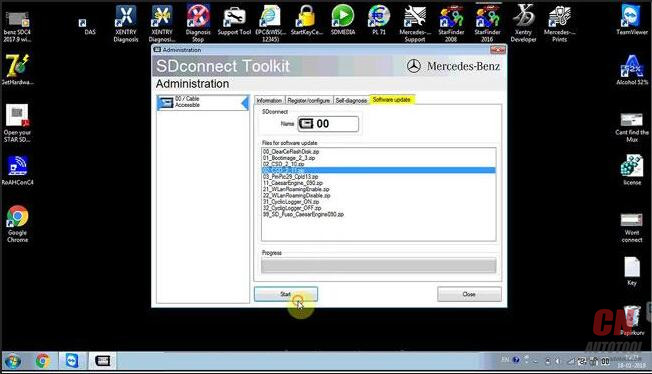
Update “CSD_2_11.zip”
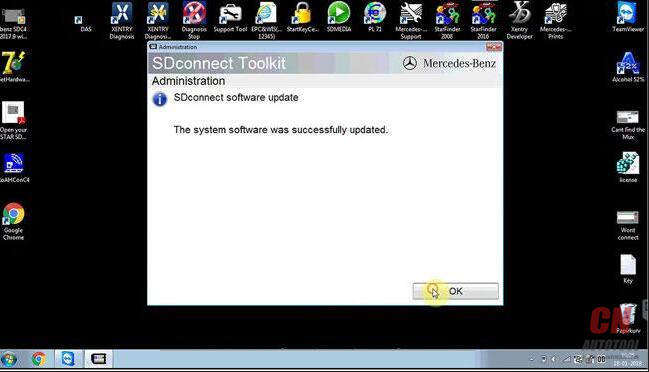
The system software was successfully updated.26-14
Back to update “Bootimage_2_3.zip”
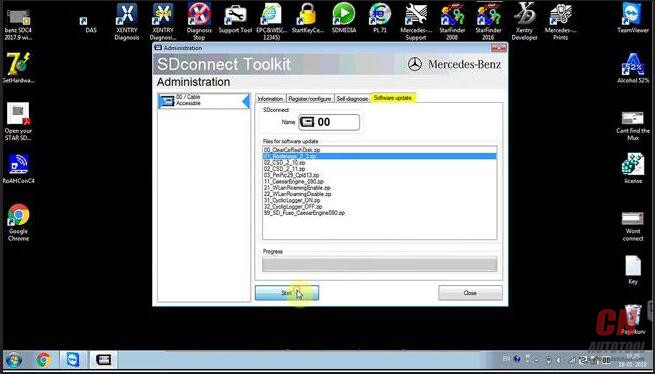
The system software was successfully updated.
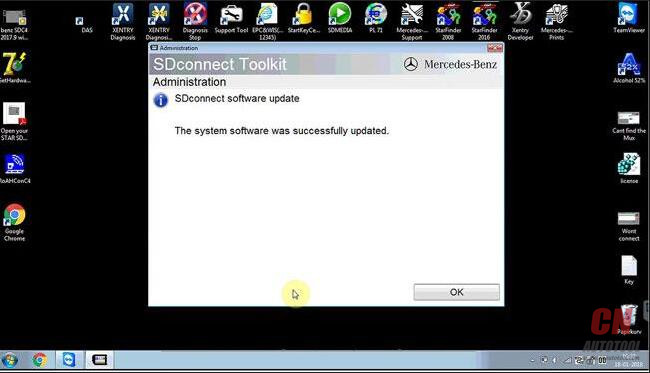
Back to click on “00/ Cable Accessible”
You see it’s accessible.

Click on “Software update”, then “03 PMpic29_cpld13.zip”
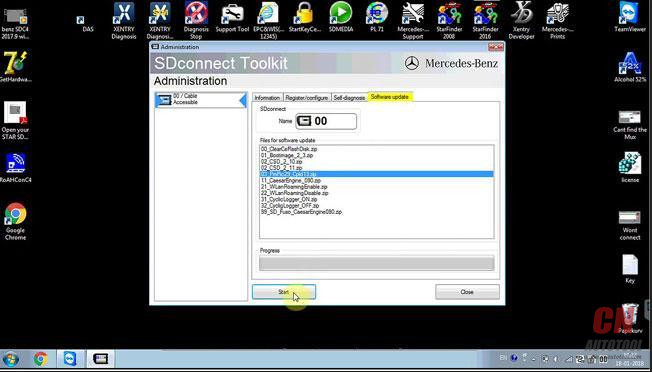
The system software was successfully updated.
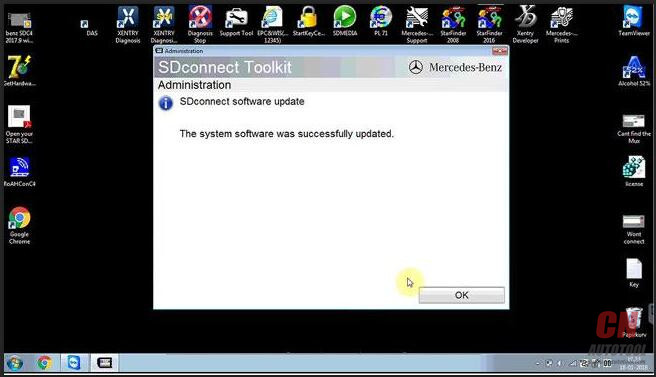
Check the information

Back to the desktop, right click on “StartKeyCenter”, then option “Properties” – “Find target” – “Mercedes Benz” – “Sdconnect ToolKit”, rename the last 3 folder, add a suffix “x”

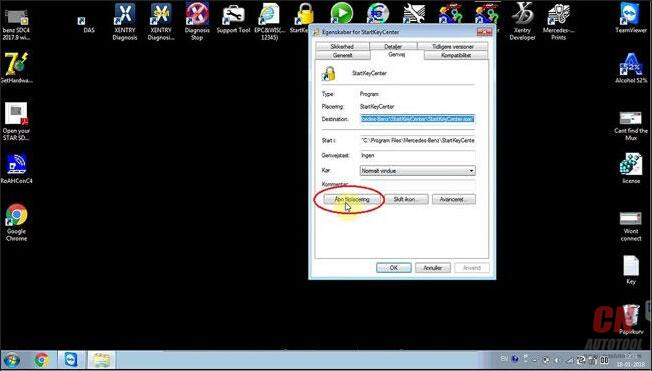
Done
SDC4 tech support supplied by http://www.cnautotool.com
http://obd2scantool.net/2018/03/10/solved-sdc4-setting-failure-and-configuration-dont-work/
How to do 2009 Benz E350 Gas tank mod reset cluster
Purpose:do Gas tank mod reset cluster on my 2009 E350.
Tool option:
MB SD Connect C4 with dell 6410 laptop(Has ssd, 4gb mem, so it should be quicker than a dell630.)
Here we go:
Found out how to reset cluster: See below part, it’s towards the end of the post.
Gas Tank Mod (Gallons) ***Need Developer Mode***


After you hit F3 it will carry on the coding process (hit “F1” to go back)
so we can reset the ECU so coding can take effect.


So far I’m loving MB STAR Diagnostic Tool. I am going to code the car this weekend for Bi-Xenons and then code the card to accept the OEM front LED city lights. I’m doing a e55 bi-xenon retro fit to replace the stock crappy h7 halogen e55 projectors.
http://obdscanner.info/2018/03/09/how-to-do-2009-benz-e350-gas-tank-mod-reset-cluster/
Tool option:
MB SD Connect C4 with dell 6410 laptop(Has ssd, 4gb mem, so it should be quicker than a dell630.)
Here we go:
Found out how to reset cluster: See below part, it’s towards the end of the post.
Gas Tank Mod (Gallons) ***Need Developer Mode***
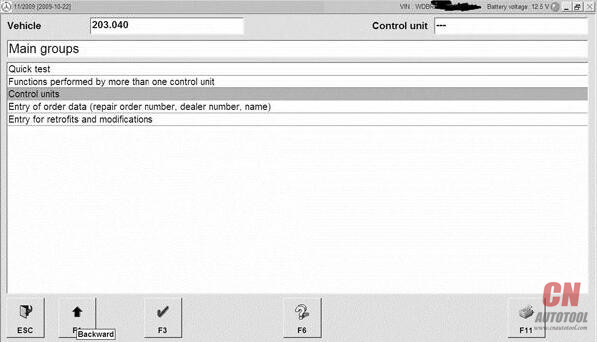
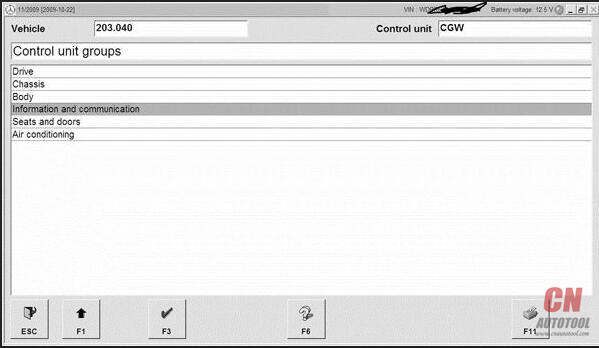
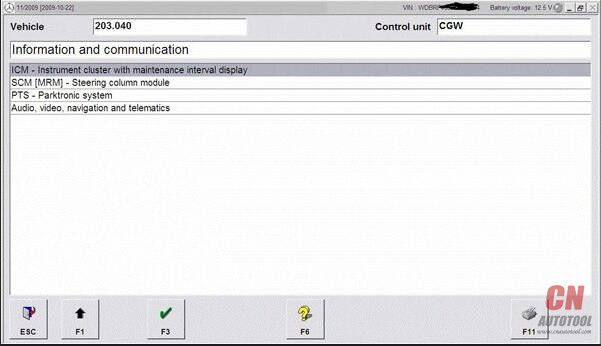
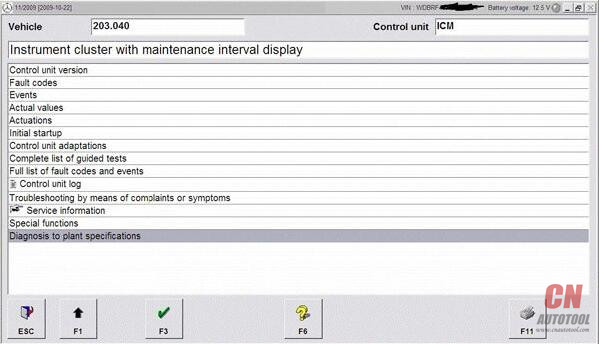
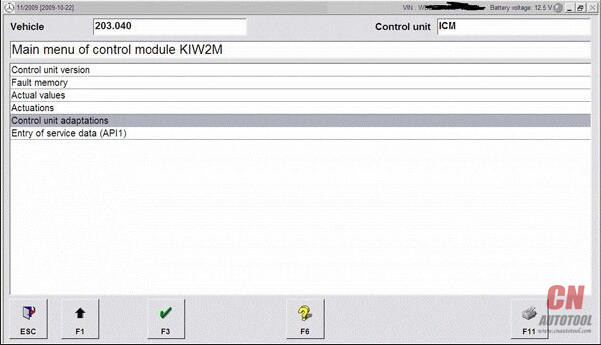
After you hit F3 it will carry on the coding process (hit “F1” to go back)
so we can reset the ECU so coding can take effect.
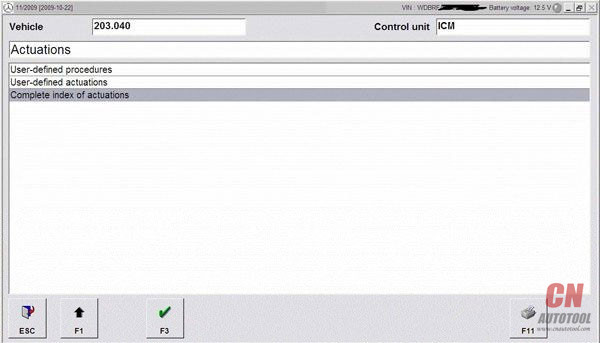
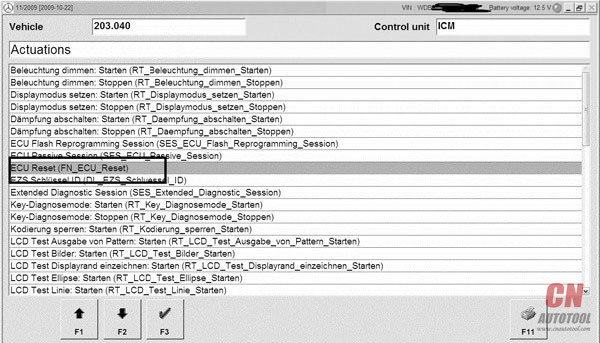
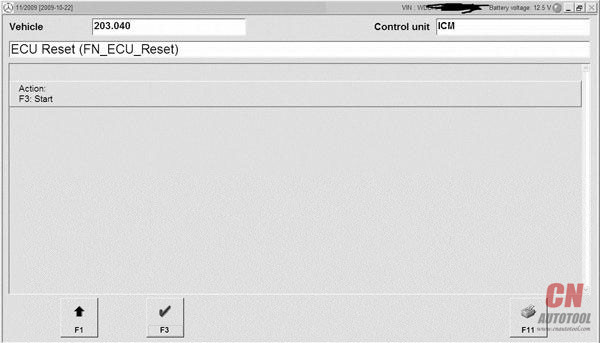
So far I’m loving MB STAR Diagnostic Tool. I am going to code the car this weekend for Bi-Xenons and then code the card to accept the OEM front LED city lights. I’m doing a e55 bi-xenon retro fit to replace the stock crappy h7 halogen e55 projectors.
http://obdscanner.info/2018/03/09/how-to-do-2009-benz-e350-gas-tank-mod-reset-cluster/
Clone Xentry Connect C5- Good & Bad Things
I bought “Original Clone Xentry Connect C5” from China’s retail store in 2017/12.
Good thing:
1. Unlike bad products of mercedes diagnostic tool C5 type C4 motherboard, texture is good
2. DoIP specification
Bad thing:
1. Because it is VM system + 32bit, the reaction is slow (SSD though …)
2. Vediamo can be used, but feeling like driving with DELL D 630 (unsuitable)
3. The DTS Monaco software is installed but the connection with the vehicle is NG (currently retail stores and manufacturer engineers are thinking about how to fix it)
4. Passwords are applied to each drive, making it hard to customize
5. Retail shops and manufacturer engineers lack knowledge (take time to support)
My thoughts
I think purchasing this product is still early.
There are too many trouble elements.
I’ll report it when the situation changes.
What I currently use (stable and comfortable)
New car: eCom (64 bit)
Normal: Clone SDConnect C4 (64 bit)
Old car: Star C3
Best regards
Good thing:
1. Unlike bad products of mercedes diagnostic tool C5 type C4 motherboard, texture is good
2. DoIP specification
Bad thing:
1. Because it is VM system + 32bit, the reaction is slow (SSD though …)
2. Vediamo can be used, but feeling like driving with DELL D 630 (unsuitable)
3. The DTS Monaco software is installed but the connection with the vehicle is NG (currently retail stores and manufacturer engineers are thinking about how to fix it)
4. Passwords are applied to each drive, making it hard to customize
5. Retail shops and manufacturer engineers lack knowledge (take time to support)
My thoughts
I think purchasing this product is still early.
There are too many trouble elements.
I’ll report it when the situation changes.
What I currently use (stable and comfortable)
New car: eCom (64 bit)
Normal: Clone SDConnect C4 (64 bit)
Old car: Star C3
Best regards
XentryDAS Expire, How to solve
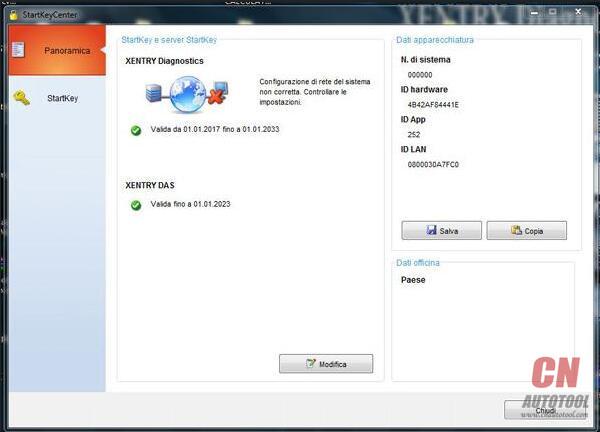
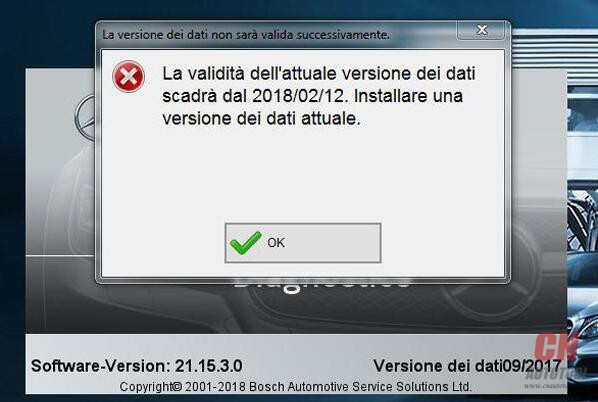
Here is 09.2017 Xentry/DAS Expire Error Message and Solution:
Xentry/DAS Expire Error:
La validata dell’attuale versione dei dati scadra dal 2018/02/21. installare una versione dei dati attuale.
Error message in English:
The validated current version of the data will range from 2018/02/21. install a current version of the data.


Upload photos…
http://www.cnautotool.com/category-192-b0-MB+STAR.html
How to solve:
Reactivate xentry or setup your PC time earlier
Better reactivate
Xentry/das can be reactivated yourself anytime if you have software from the site: CnAutotool.com
http://obd2scanner.info/2018/03/09/xentrydas-expire-how-to-solve/
Xentry/DAS Expire Error:
La validata dell’attuale versione dei dati scadra dal 2018/02/21. installare una versione dei dati attuale.
Error message in English:
The validated current version of the data will range from 2018/02/21. install a current version of the data.
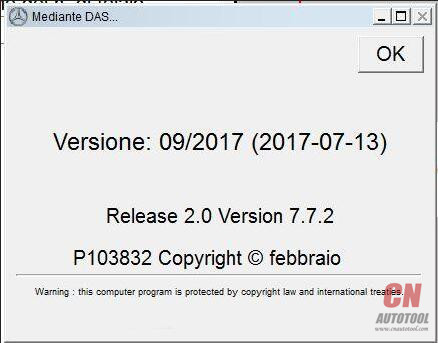
Upload photos…
http://www.cnautotool.com/category-192-b0-MB+STAR.html
How to solve:
Reactivate xentry or setup your PC time earlier
Better reactivate
Xentry/das can be reactivated yourself anytime if you have software from the site: CnAutotool.com
http://obd2scanner.info/2018/03/09/xentrydas-expire-how-to-solve/
2018.3 SD connect c4 software Xentry Das 100% Works
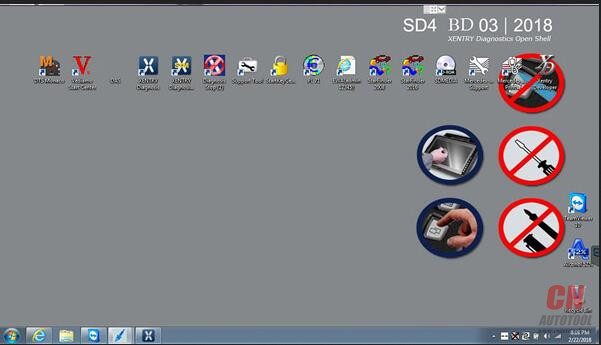
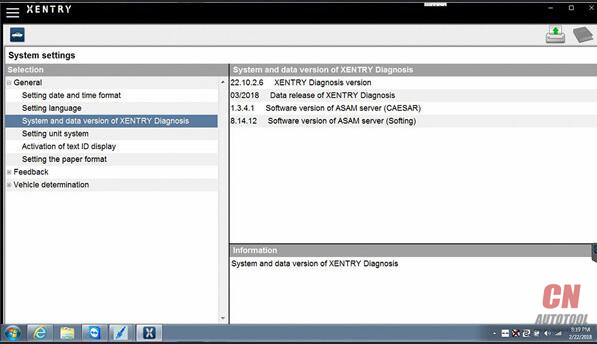
New software come!2018.03 Mb Star Connect C4 software (XENTRY/DAS) is verified to work with the sd c4 diagnostic tool without issues. Here is the test report of it.
This is the working mercedes software 2018.03


http://www.cnautotool.com/category-192-b0-MB+STAR.html
256GB Complete New SSD, High quality!
Latest software version: V2018.3
Support Windows 7 system.
NOTE:
Don’t download anything to the software, don’t update anything of the software, otherwise the software will break down.(Especially browser such as Google Chrome)
Mercedes bus diagnosis & programming can be done via DAS only, NOT Xentry.
Software languages: Chinese, English, Croatian, Czech, Danish, Dutch, Finish, French, German, Greek, Hungarian, Italian, Japanese, Korean, Polish, Portuguese, Romanian, Russian, Spanish, Swedish & Turkish.
V2018.3 MB SD C4 Software Functions:
1.1989~up to now Car, Bus, Truck, Sprint, Smart ;
2.All electric system Diagnostic;(Do not include flash code)
3.reading trouble code
4.erasing trouble code
5.live-data
6.adaptation
7.component testing
8.maintenance
9.information consultation
10.component location diagram
11.wiring diagram
Testable systems:
ENGINE
AUTO-SPEED
AIRCONDITIONAL SYSTEM
SRS
ABS
ASR
MPL
GM
Bz ORIGINAL ANTI-THEFT
DASX SYSTEM
KEYZESS GO SYSTEM
OBD-II SYSTEM
Product software includes: (Version: 2018 )
1. D-A-S / Xentry 2018.3: the automatically Diagnosis Assistance System
Concise interface and straightforward operation with IB M high-quality computer can realize the quick and accurate code reading and the whole car system testing
2. W-I-S net 2017.10: Workshop Information System
Supply the whole view of the wiring diagram in a car, component location diagram and maintenance method. What you do is to enter the chassis number, and then you will get the manufacture data, engine configuration and the car model -all in detail.
3. EPC.net 2017.10: Electronic Parts Catalog
4. ST Finder: Part Location Finder options: 2008 and 2016
5. STARUTILITIES : the movement management system and self-test
6. SDMEDIA 2014
7. PL71: 2016 Mercedes software with PL70
Work With:
SD Connect C4 Mercedes diagnostic tool from
http://www.cnautotool.com/goods-6508-MB+SD+Connect+C4C5+Star+Diagnosis+Plus+Panasonic+CF19+Laptop++With+Vediamo+and+DTS+Development+and+Engineering.html


Note: there are many versions of sdconnect china clone; please check the PCB design and make sure your mux is working with the software before you wanna purchase the software.
http://autotool.biz/2018/03/09/2018-3-sd-connect-c4-software-xentry-das-100-works/
This is the working mercedes software 2018.03

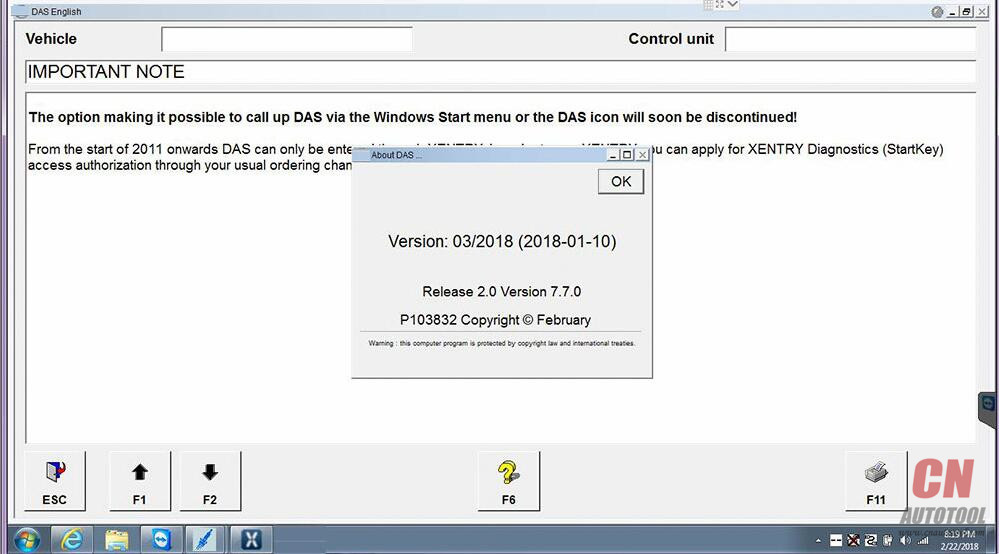
http://www.cnautotool.com/category-192-b0-MB+STAR.html
256GB Complete New SSD, High quality!
Latest software version: V2018.3
Support Windows 7 system.
NOTE:
Don’t download anything to the software, don’t update anything of the software, otherwise the software will break down.(Especially browser such as Google Chrome)
Mercedes bus diagnosis & programming can be done via DAS only, NOT Xentry.
Software languages: Chinese, English, Croatian, Czech, Danish, Dutch, Finish, French, German, Greek, Hungarian, Italian, Japanese, Korean, Polish, Portuguese, Romanian, Russian, Spanish, Swedish & Turkish.
V2018.3 MB SD C4 Software Functions:
1.1989~up to now Car, Bus, Truck, Sprint, Smart ;
2.All electric system Diagnostic;(Do not include flash code)
3.reading trouble code
4.erasing trouble code
5.live-data
6.adaptation
7.component testing
8.maintenance
9.information consultation
10.component location diagram
11.wiring diagram
Testable systems:
ENGINE
AUTO-SPEED
AIRCONDITIONAL SYSTEM
SRS
ABS
ASR
MPL
GM
Bz ORIGINAL ANTI-THEFT
DASX SYSTEM
KEYZESS GO SYSTEM
OBD-II SYSTEM
Product software includes: (Version: 2018 )
1. D-A-S / Xentry 2018.3: the automatically Diagnosis Assistance System
Concise interface and straightforward operation with IB M high-quality computer can realize the quick and accurate code reading and the whole car system testing
2. W-I-S net 2017.10: Workshop Information System
Supply the whole view of the wiring diagram in a car, component location diagram and maintenance method. What you do is to enter the chassis number, and then you will get the manufacture data, engine configuration and the car model -all in detail.
3. EPC.net 2017.10: Electronic Parts Catalog
4. ST Finder: Part Location Finder options: 2008 and 2016
5. STARUTILITIES : the movement management system and self-test
6. SDMEDIA 2014
7. PL71: 2016 Mercedes software with PL70
Work With:
SD Connect C4 Mercedes diagnostic tool from
http://www.cnautotool.com/goods-6508-MB+SD+Connect+C4C5+Star+Diagnosis+Plus+Panasonic+CF19+Laptop++With+Vediamo+and+DTS+Development+and+Engineering.html
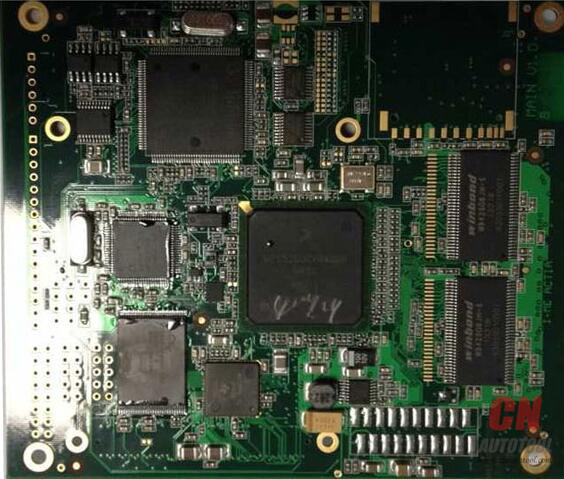
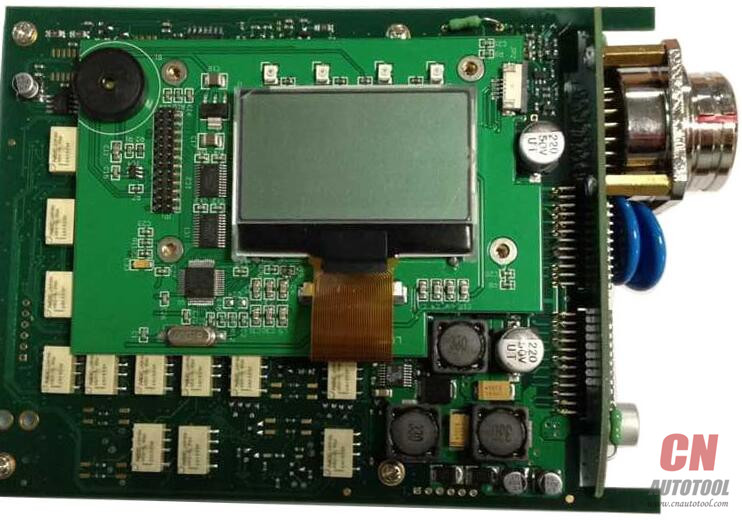
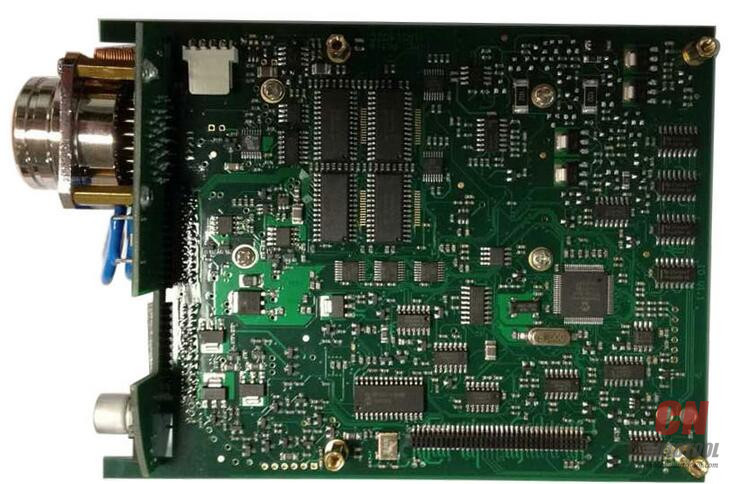
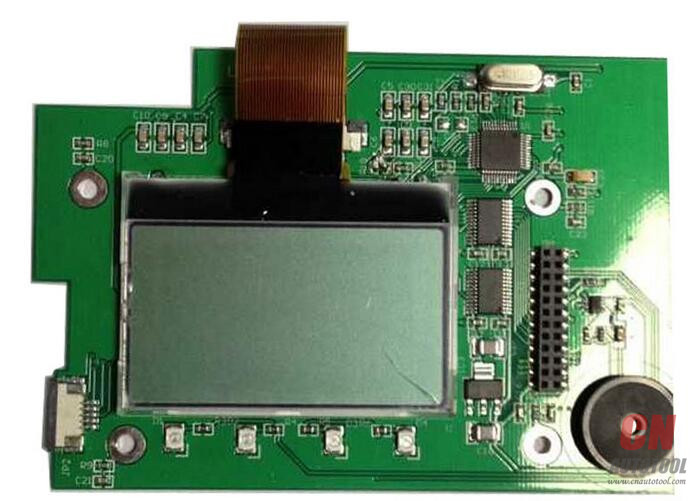
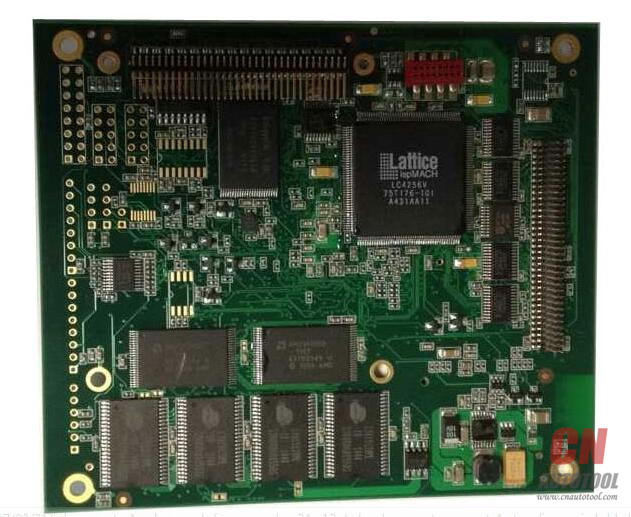
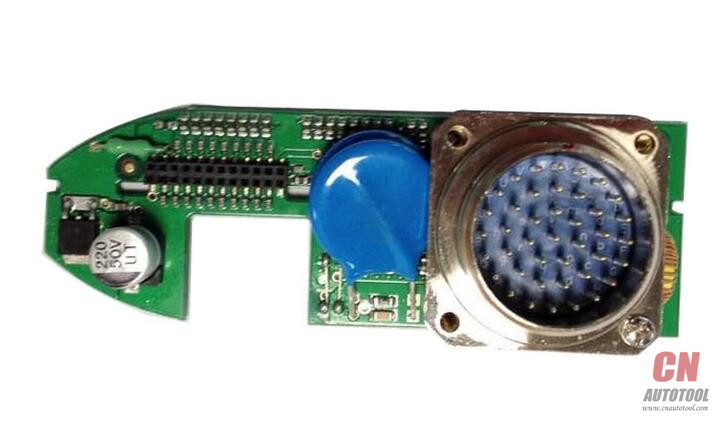
Note: there are many versions of sdconnect china clone; please check the PCB design and make sure your mux is working with the software before you wanna purchase the software.
http://autotool.biz/2018/03/09/2018-3-sd-connect-c4-software-xentry-das-100-works/
订阅:
博文 (Atom)